Minibox 3 Column Modified Blogger Template

July 28, 2009 2 comments
Minibox is a free 3 column blogger template created by James William that was heavily based on the popular Minima template. This template is an XML based. The code uses here is very similar to the structure of the Minima template. It is almost identical in variable names and section identifiers so that people can be familiar with it to modifying the Minibox template code. Minibox is completely compatible with Blogger's drag-and-drop layout manager.

I love this template but as I see and experience this template has three major problems. So I try to correct those errors and made good solutions for that. And it comes out so great. I also added some features to this template. But if you don't want the added features just remove it in the Layout Manager. So enjoy.

Minibox 3 Column Modified Blogger Template
Problems that Minibox 3 Column has:
  1. You can't upload it, if you try to upload it some errors occured.
  2. You can't add gadget between the header and the templates body.
  3. The codes is not full coded.
Minibox 3 Column Modified capable with:
  1. You can upload it directly.
  2. You can add gadgets between the headers and the templates body.
  3. The code is fully coded for modification.
Added Features:
  1. Navbar has been remove
  2. Google Translate Widgets
  3. Live Traffic Feed Widgets
  4. No Right Click Widgets
  5. "Post Title | Blog Title" SEO Trick. (Click the image to enlarge it)
  6. Minibox 3 Column Modified Blogger Template
  7. "Read more posts filed under + Labels Name" Widget tags. (Click the image to enlarge it)
  8. Minibox 3 Column Modified Blogger Template
  9. "Blog Title" Widget tag. (Click the image to enlarge it)
  10. Minibox 3 Column Modified Blogger Template
  11. Show a "Related Posts" below each of your posts. Related Posts will only appear in your single posts page. It will not appear in your homepage. (Click the image to enlarge it)
  12. Minibox 3 Column Modified Blogger Template

You can download the Minibox 3 Column Modified here.

No Right Click for Blogger/Blogspot

July 24, 2009 2 comments
How to disable right click on Blogger(blogspot)? It is easy to disable the right click option in blogger, we just need to add a javascript code to our page.

Why we do this? We all knew that if we right click to the images and articles (highlighted) in our pages a menu will pop out for many options like copying the links, to save, to open a link to a new tab or window and etc. We want to disable this option to prevent people for copying our blog posts, articles, images and other kind of information owned by you.

How to setup the No Right Click to our blog? Simply, just follow the steps below:
  1. Download the script here and extract the file.
  2. Log in to your account and go to your blogs' Layout. In my blog it looks like this (click to the images to enlarge it):
  3. At the sidebar click Add a Gadget and select the HTML/JavaScript gadget by clicking the plus sign.
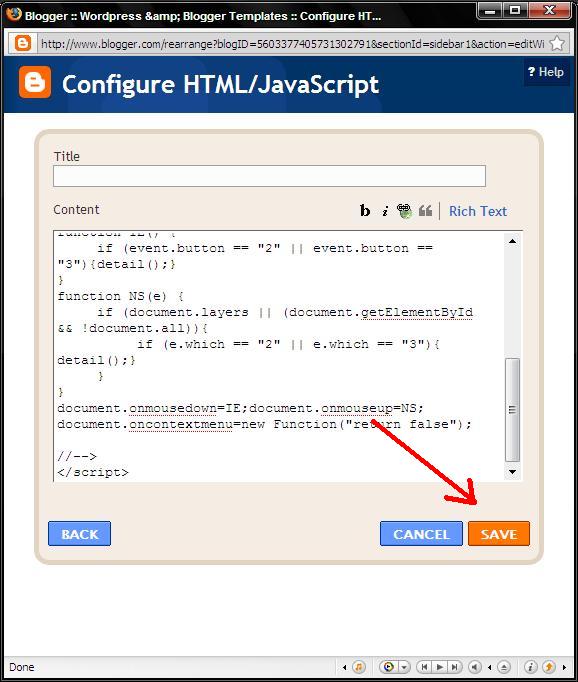
  4. Now open your extracted file that you downloaded, the no-right-click-1.txt. Copy the codes there and paste it to your added gadget, just like the picture below:
  5. and Save, and your done.
Now browse to your blogs' home page and test if our codes is working. If it is not working as the way you enter the code, post your comment here and I will assist you.

The Minibox 3 Column Blogger Template

July 13, 2009 Leave a comment
Minibox is a free 3 column blogger template heavily based on the popular Minima template. This is an XML based Blogger template for newer Blogspot blogs. The code uses very similar structure and almost identical variable names and section identifiers so that people familiar with modifying the Minima template shouldn't have much trouble modifying the Minibox template code.

Minibox is completely compatible with Blogger's drag-and-drop layout manager. The original 2 column version of Minima was written by Douglas Bowman of stopdesign.com. Here's a quote from his website:
The goal was to provide a fresh selection of well-designed and efficiently-coded, standards-based templates that provided solid yet flexible starting points for anyone to use as a design for their new or existing blog.
Minibox 3 Column Blogger Template
Download it here. If you're having trouble downloading the template try right-clicking and choosing "Save As". If you're still having trouble post a comment.

This is the first release. If anyone notices any glitches please post a comment and I will try to resolve ASAP.

Alternate colour combinations or slight variations are also likely to follow. If there are any requests, please post a comment and I will take requests into consideration.